Sunday, October 9, 2016

Canary Browser Has Stopped Working - Will Not Open

Canary browser stops opening try Chrome 64 portable.
Try Chrome 64 Browser

Canary browser can suddenly stop working on some laptops and PCs. There seems to be no fix for this issue. Believe me I have tried everything, old restore points, choosing Windows 8 compatibility, uninstalling/reinstalling both Canary and Chrome - nothing works. Oddly, I have another laptop and PC and Canary browser continues to work on them.
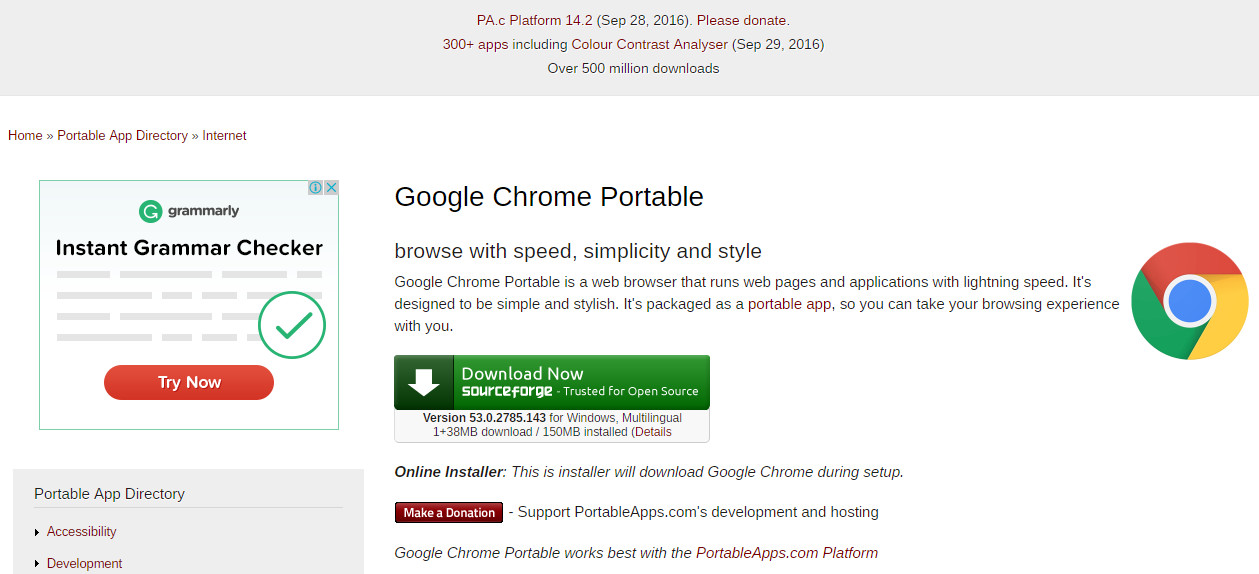
Chrome 64bit portable
Ah well, we will have to move forward. Windows 10 is c..p anyway. Are you aware that Windows 10 has been completely rewritten since the free upgrade. It looks the same but it is as different as IOS. 

I recommend you download and try Chrome 64 Portable. Yes there is a 64bit version out there.

     The download link is on the Portable Apps webpage.

     The direct download link is here


I hope your computing is bug free.
Good Luck!


Saturday, October 8, 2016

WYSIWYG Webbuilder is Not Compatible With Windows 10

Will not run, will not operate correctly, error, not working
WYSIWYG Webbuilder is not compatible with Windows 10.  It will not operate correctly.  It runs very slowly, does not respond and whites out.  The developers of WB must act soon or they will go out of business.
WYSIWYG Webbuilder 11
If you make a new post in WB community and it contains words such "will not work", "does not operate correctly" and so on it will be removed.  However, you cannot hide or run from the truth.  The software is incompatible.

WYSIWYG Webbuilder it still taking money from people.  They know they are stealing!

The Windows 10 free upgrade was okay.  WB did work with that operating system.  Microsoft has secretly rewritten the whole Windows 10 system.  It looks the same as the free upgrade but underneath, it is absolutely, totally different.

It is possible that WB will be hit with legal action.  If people pay and lock themselves into the WB system they could suffer monetary loss in the near future when they are unable to effectively edit their sites.


Monday, September 26, 2016

Access Denied You don't have permission to access "http://sdlc

When you try to install Java Runtime environment  by Oracle you will now be hit with this message:

Access Denied

You don't have permission to access "http://sdlc-esd-stage.oracle.com/ESD6/JSCDL/jdk/8u101-b13/JavaSetup8u101.exe?" on this server.

Reference #18.6b7d117.1474816754.d96a7d5


This is not a block done by Windows 10.  Though such behavior is notable by Microsoft like blocking the installation of freeware competitors to 365 Word which should be stopped by national trading authorities.  Microsoft has a popup that says the programs will not run on Windows 10.  However, install a freeware word processor using a PC running windows 7, transfer the program folder over to a Windows 10 laptop, create a shortcut to the "exe" file, and it will run perfectly.


Now let's get back to the current issue.  Because of legal problems Oracle must now get an acceptance of its terms and conditions.  You must got to, 


http://www.oracle.com/technetwork/java/javase/downloads/jre8-downloads-2133155.html


Cursor down to "Java SE Runtime Environment 8u102".  Click the little circle next to "Accept License Agreement" in the 8u102 box and the message will change to,

 "Thank you for accepting the Oracle Binary Code License Agreement for Java SE; you may now download this software."


Cursor Down to "Windows x64 Offline".  Download and install Java.

Have a good day!

Thursday, March 13, 2014

Get to Google faster. Update your default search engine. Sure. No thanks. How to Stop it.

                                  
There is an easy way to stop getting the,

 "Get to Google faster. Update your default search engine.  Sure. No thanks."

message at the top of the Google start page.
...................................................................................

A lot of old stuff still exists out there.  There is an ancient URL for Google that was once used to get to iGoogle.  This URL can be modified to your region and the "Get to Google faster" nuisance message does not appear.


As an example the usual URL for Google Australia is "https://www.google.com.au/".  The nuisance nag always shows at the top of the Google page when I start Internet Explorer.

If I use the URL "http://www.google.com.au/webhp?nord=1" as the start page the nag message does not appear, but the normal Google au search page appears.

Just modify the URL for your region.

If you are in the uk use the URL "http://www.google.co.uk/webhp?nord=1".

No need to download  Adblock 1.3.10. and enter "##DIV#mgmhppd" as a new filter rule.

Just use the URL as set out above.

There we have it.

Happy Interneting
                           Ty
Internet by Ty Buchanan 

Saturday, November 17, 2012

Adding Your Own Favicon Icon to Your Blogspot Blog Template

YOUR OWN FAVICON IN THE OLD BLOGSPOT BLOGGER INTERFACE

If you don't like the new interface - like me - you can just edit the HTML.

Make your 16x16 pic, change it to the ".ico" format and rename it "faviconbyme.ico".

Upload it to the "images" folder on your ordinary website server.

This images folder should be in /public_html/ - the usual place.


Sign into the Blogger Dashboard and choose "Template".

Put the following code (change it to your own website name) above "</head>" .


<type="text/css" /><link rel="shortcut icon" href="http://www.yourwebsite.com/images/faviconbyme.ico" type="image/x-icon" />

Save it and now you have a pretty little icon for users who want to follow your blog.  Users will put your blog URL in their "Bookmarks".

The code,
<link rel="icon" type="image/vnd.microsoft.icon" href="http://www.blogger.com/favicon.ico"/>
could still be in the blog html.  You can leave it or remove it.  Your code will override the microsoft icon instruction. 

. . . . . . . . . . . . . . . . . . . .
Favicon icon Blogspot Blog template html code dashboard
TwitThis