Showing posts with label website. Show all posts

Wednesday, June 27, 2012

The Problems With Planet Domain Web Hosting, Reviews, Blog.


PLANET DOMAIN

Planet Domain is a self-assured company, in that it believes in treating customers as it sees fit.  It also offers consumers a product of their own making and expects users to accept their price.  planet domain.
I have been a Planet Domain customer for over six years.  I am really upset at the way they are treating me.  Every year there is a hassle as they get confused over automatic credit card payment and sending out a bill.   They think "We will send them a bill whether they pay that way or they pay automatically, just to p... them off."    planet domain
      
Every month on the last two or three days my website runs out of bandwidth.  They are trying to make me pay $155 a year too increase my bandwidth. It's $240 for unlimited bandwidth. When I tell them all the other providers give unlimited bandwidth from the very basic package up, they just mumble away with a lame excuse.  planet domain
Planet Domain has an advertised table of Host Plans and a "secret" business system that is not really advertised.  They charge more for a business plan though you don't get anything more than the ordinary plans.    planet domain
      
They are moving all websites to new servers one at a time.  My turn came today.  The person on customer support told me he would send out a link explaining the delay I would experience.  Furthermore, he would send the link by email, only to my website server.  This was stupid, considering the server is down.  I don't have access to get the link!      planet domain
       
To put it bluntly their support technicians are second rate.  They can't even take justified customer complaints.  They recently sent me email saying I had no right to abuse them.  Well, with the service they offer they must get plenty of it.      planet domain

Please, take my advice and don't lodge your web hosting with Planet Domain.  I will certainly be changing.

Wednesday, February 1, 2012

Reciprocal Link Code Often Has Serious Errors That Mess Up Your Site Ranking

You have to be careful when making reciprocal links. Many websites that offer HTML code for you to use don't spend enough time checking their code.

A site as an example is "http://www.traveldirectory.com.au/".

It offers quite pretty little set ups for you to put on your site. The "feature" even has a search function with a text entry window and a go button.

But beware, the code has dozens of HTML code faults, yes dozens.

If you put this HTML in your web page Google and other search engines will give up when it meets the mass of errors, and the text after the code will not be included in the search. This is bad news for you - your website will rate poorly.

Don't just assume that reciprocal link HTML is correct. Download the Firefox HTML Validator plugin and look at the code before you use it.


NON-EXISTENT LINKS


Another thing is non-existent reciprocal links. On many occasions whether you ask for a reciprocal link yourself or another site asks you, after you put their link on your page they don't honor their part of the bargain. They just assume you will not check it. Go to http://www.webconfs.com/reciprocal-link-checker.php and do a check. If they don't put your link on their site remove them from your own website. Furthermore, a link from your homepage is wonderful for the other site, but a link to their link page is useless for you. Nobody clicks on a link to a link sub-page. For a link to count it must be to and from homepages or between internal pages that are rated in their own right by Google. Basically, getting reciprocal links to directories is a waste of time and effort. They have no links on their home page and all outgoing links are on worthless sub-pages.

Thursday, October 21, 2010

An add-on failed to run

When you see the message "An add-on failed to run on this website" or something similar depending on which version of Internet Explorer you are using go to,

"Tools", "Internet Options", "Security" tab, "Custom level..."

Select "Medium". Click "Reset".

Change the settings to look like this,

Click "OK", then "OK" again.

Close Internet Explorer. Some of the new settings will be reset by IE. Don't worry the ones you need will stay changed.

Restart IE. Enter an About website URL.

This is the main site for the problem.

The site should open without the warning because the Flash on the site should now be working.

Unfortunately, this will not always work for IE8. However, It will always work for IE9 Beta.


Installing Adobe Macromedia Shockwave Player for Mozilla Firefox
Installing Adobe Macromedia Shockwave Player for Internet Explorer
Installing Macromedia Adobe Flash Player for Internet Explorer
Installing Macromedia Adobe Flash Player for Mozilla Firefox
Installing a Program to Run SWF Files
Disabling UAC for a Program

Wednesday, April 14, 2010

LInk to a Bookmark in a URL

This is quite straightforward though the answer does not show up in web searches that often.


Just put "/#bookmark4" for example after the webpage URL.

Say the page address is,
"http://tysaustralia.com/australiantechnology.html"

and you want to send visitors to a paragraph with a bookmark link in another webpage. The paragraph has bookmark7 where it is located.

You put this link in an image or text:
"http://tysaustralia.com/australiantechnology.html#bookmark7".

Don't put a forward slash after the ".html" in the address.

Tuesday, October 27, 2009

Internet Seer is a Fraud Site That Aims To Get Money From You

This is just to let you know about a rogue site. The site is InternetSeer

http://www.internetseer.com/home/index.xtp

Somehow it stops Google from picking up a web page from your site. I don't know how these people do this, but they do. My web page went from number one in Google to disappearing.

I changed the name of the web page and it appeared again in the listings a month later.

An email is sent to you from InternetSeer:

"Second Error Alert Your Web site is still not responding
URL: http://tysaustralia.com/australianhistoriography.html
Time: Fri Oct 23 08:46:25 EDT 2009
Error Type: 500 Internal Server ErrorSupport-FAQWhy is your Web Site not responding? The error listed above could have been caused by any number of events including connectivity problems in the Internet. Please refer to our Error Codes for additional information on the specific error. This error is not necessarily a problem with your hosting service or Web server. Click here to learn more. "

I have checked my web page regularly and I know that it was responding on 10/23/09.

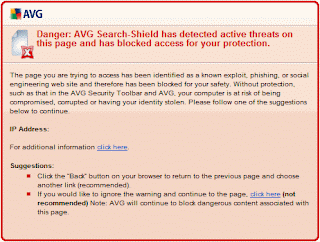
When I click on a link in the email AVG gives the following message:

If my web page was down how did they know it?


. . . . . . . . . . . . .

Friday, September 25, 2009

Php Only Includes the First Line of Articles in Website Keywords Seen by Google

Beware of what php rss feed programs claim! If you manage to get php working on your site only the words in the first line of each article will be included in your website words when it is crawled by Google, Yahoo, etc. So the claim by RSS Feedreader and Include are incorrect. This means only those words you can actually see written under each article title when your webpage is displayed will be included in your site's key words. Authors who put feeds together will often paraphrase the first paragraph of an article. If this happens none of the articles text with be caught by Google when it checks your site.

Remember only the text actually displayed in the RSS articles on your webpage can be seen by Google - usually one sentence per article. Choose RSS sites with your keywords in the first line.

Another thing is that in "most cases" no words will be gleaned if the feed address has an ";rss" or ".rss" address, though many "/rss" and "=rss" addresses will work. Some will, some won't. Be sure to use feeds with ".xml" addresses if you want to have words that are seen by Google and Yahoo!

Though words are visible under each title in a feed with an "RSS" address, they are not usually visible to Google.

With rss addresses, keywords will show when you check the feed site with a keyword checking site, but they will not show when you have ".php" files on your server containing Include script for example, and you put links to the ".php" files in your webpages.

These problems are due to the way your server is set. Web hosting companies do not like to tell you how to turn off server protection. In fact they go out of their way to refuse changes.
. . . . . . . . . . . . .