Showing posts with label user. Show all posts

Thursday, July 19, 2012

Google Must Be Prosecuted For Charging Non-US Users of Google Voice

Google Gmail offers a new Internet phone service if you have a Gmail Account. There is one thing about running such a service on the Internet; that is it costs nothing for the company providing the service to run. Users pay a local telephone company for access to the Internet from their homes and on their mobile phones. The connection goes through each country via local telephone companies servicing the internet and phone lines.

There is no charge for US Gmail users and a charge per call for those living in other countries. Though it is a small amount it is discriminatory. The Internet goes all around the world like a net. Access to this net is open to anyone. No country charges its population to access the net to other countries. The European furniture company Ikea has already been accused of cross-subsidization for charging different prices for the same products in different countries. The production and even distribution costs are much the same.

Google's discrimination against non-US citizens must be stopped. Legal action must be pursued. Such charging by Google is illegal unless it also charges US citizens. Please comment on this because this is really annoying and should not happen. Google is an international company not a US company.
★

Sunday, May 17, 2009

Disabling UAC

THE TWO METHODS OF STOPPING UAC WARNING WINDOWS POPPING UP WHEN YOU START A PROGRAM
Method One by altering computer settings.
Method Two by using the Norton anti-UAC program.

METHOD ONE

There is a way of disabling UAC for a program by "tinkering" with the computer.

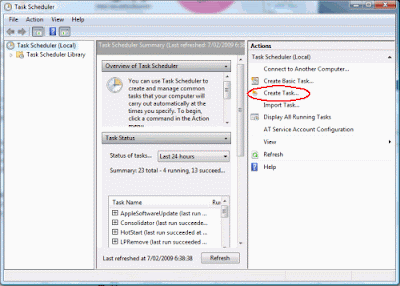
Type "task" in Start Search after clicking the Start menu.

Click "Task Scheduler" from the list that appears. A window opens.

Click Create Task.


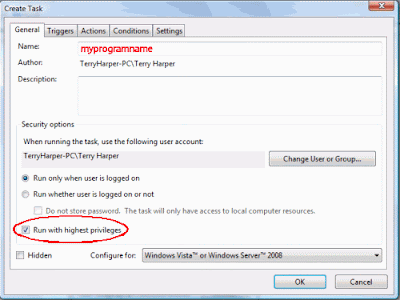
Choose the General Tab.

Enter a word significant to you in the Name square.
Tick Run with highest privileges.


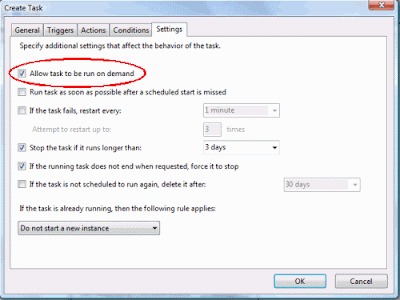
Choose the Settings tab

Tick Allow task to run on demand.

Click OK. Then close window.


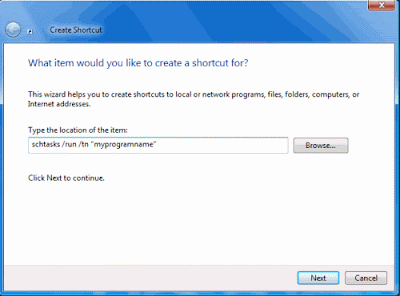
Right click on a blank area of the Desktop. Click New, Shortcut.


In the Shortcut window enter: schtasks /run /tn “myprogramname“
Enter the name of your shortcut. Click Finish


The shortcut is now ready to be placed in a suitable location and used.


Note: When you click the shortcut you will briefly see a small DOS window before the program starts.


METHOD TWO

A much better way to stop the UAC warning window opening is to install the program developed by Norton Labs. It is an excellent program which does the job well.

Click Start Menu, Control Panel then Classic View.

Choose Device Manager.

Display the chip name by expanding the folders, i.e.,

click the computer name folder then Computer folder.

You will see that this computer has an "X86" chip. This is important. Write it down.

Close all the windows.


Open Internet Explorer and type this into the top window of IE:
http://www.nortonlabs.com/inthelab/uac_beta.php

Press Enter.

In the window which opens, enter the name of your country.

Also tick "I certify that this...."


Press Get It! and a new page opens.

Press either Download for x86 or Download for x64 according to the chip in your computer that you wrote down earlier.

With the latest computers you will download the NUACx86.exe file.

Double click this file to install it.

Now, this is the action part.

When you click the shortcut of some programs in the future a new type of UAC window will appear created by Norton. Tick the box next to "Don't ask me again" in this Norton window if you do not want a UAC window to appear again for a program.


You now have what you want - a way to stop UAC warning windows ever opening again!

*